


5. Variables
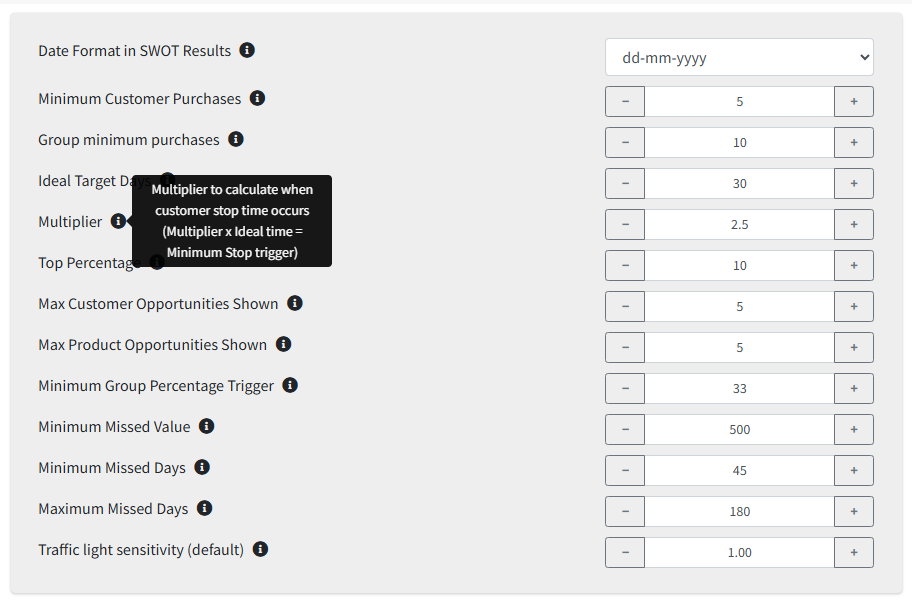
Variables are the organisation-wide settings behind the SWOT lists. Rest the pointer on the ⓘ beside each for a reminder of what it does.
| Variable | What it does |
|---|---|
| Display | |
| Date Format in SWOT Results | The company-wide date format used in SWOT results. |
| Traffic light sensitivity (default) | The starting Sensitivity for traffic lights in Dynamic Reports. Each person can still move their own slider. |
| When a customer counts as stopped | |
| Minimum Customer Purchases | How many times a product must have been bought before stopping counts. |
| Ideal Target Days | The ideal time between a customer's repeat purchases. |
| Multiplier | Multiplier × Ideal Target Days is the gap that triggers a stop. |
| Minimum Missed Days | The shortest gap before a loss is reported. |
| Maximum Missed Days | The longest gap still reported — older losses drop off the list. |
| Minimum Missed Value | The smallest lost value worth reporting. |
| Groups and opportunities | |
| Group minimum purchases | How often a group must buy before group calculations apply. |
| Minimum Group Percentage Trigger | The share of a group that must buy something before it is flagged as an opportunity for the rest. |
| Top Percentage | The cut-off used when reporting top customers and products. |
| Max Customer Opportunities Shown | The most opportunities listed, based on similar customers. |
| Max Product Opportunities Shown | The most opportunities listed, based on similar products. |
Change one at a time
Variables affect every user's SWOT lists at once. Change one, look at what moved on the lists, then decide on the next — changing several together makes the effect of each impossible to see.